
Introducing the Proactive Agent: An AI Teammate That Keeps Your Board in Sync
The Proactive Agent watches your meetings and emails, then automatically creates, updates, and transitions tickets on your board. No one has to remember to file a ticket ever again.
Every product team has the same problem. The meeting ends. Everyone agrees on what needs to happen. And then someone has to spend the next thirty minutes translating those decisions into tickets, updating statuses, and making sure the board reflects reality.
Sometimes that happens. Often it doesn’t. Decisions fall through the cracks, tickets get created days later with half the context missing, and the board slowly drifts from what the team actually committed to.
Today we’re releasing the Proactive Agent, and it eliminates this problem entirely.
What It Does
The Proactive Agent is an always-on AI teammate that watches what your team discusses — in meetings and emails — and automatically keeps your project management board in sync. No one has to remember to “file a ticket for that.” No one has to spend thirty minutes after standup creating tickets and updating statuses. The board just reflects what the team decided.
How It Gets Triggered
Post-meeting automation. After every meeting ends, the agent automatically receives the full transcript and kicks off a run. It reads everything that was discussed, researches the context, and then creates, updates, or transitions tickets based on what the team actually committed to. The meeting ends, and minutes later the board is updated.
Email-to-board inbox. Team members can forward any email to Telos, and the agent reads the message and takes the appropriate board actions. A bug report forwarded from a client, a feature request from sales, a vendor thread with deliverables — forward it in, and the right tickets appear on the board with the relevant context already filled in.
Deep Context Before Action
This is the core of what makes the Proactive Agent fundamentally different from a simple “transcript-to-ticket” bot. Before it proposes or executes a single action, it runs a full research cycle across every knowledge source your team has.
Past meeting transcripts. It searches your history of meetings for prior discussions related to what was just talked about. If the team discussed the same feature three weeks ago and already made decisions, the agent knows that and builds on it rather than starting from scratch.
Your ticket board. It searches existing tickets on Jira, Linear, Asana, or Azure DevOps before creating anything new. The agent will never create a duplicate ticket. If a ticket already exists for what was discussed, it updates that ticket instead.
Uploaded documents. It searches any specs, RFCs, PRDs, or reference material your team has uploaded. If someone discussed a feature in the meeting and there’s a spec doc for it, the agent reads it and uses that context to write a better, more grounded ticket.
Indexed emails. It searches your team’s email history for related threads, client conversations, or prior requests that provide background on the topic.
GitHub. If the discussion involved a bug or anything technical, the agent searches your repos for relevant code, pull requests, and issues. A ticket about a login bug gets grounded in the actual code and related PRs.
Confluence. It searches your team’s wiki for related documentation, architecture decisions, and runbooks.
The result is that every ticket the agent creates or updates is grounded in the full picture of what your team already knows and tracks. It’s not parroting back what someone said in the meeting — it’s synthesizing that against everything else the team has done.
The Browser Agent
This is the one that tends to stop people mid-demo.
The Proactive Agent can launch a browser sub-agent that goes out onto the web, navigates real websites, interacts with pages, and captures screenshots.
If someone in a meeting says “there’s a bug on the checkout page,” the agent can actually go visit the checkout page, see the bug, take a screenshot, and attach that screenshot directly to the Jira ticket it creates. It can log into internal tools, navigate to specific pages, fill out forms, and visually verify what the team discussed.
Screenshots captured by the browser agent are stored and automatically attached to any tickets created from that investigation. The ticket arrives with visual evidence already included, not just a text description.
It turns the agent from something that only processes text into something that can actually go look at the thing the team is talking about.
Two Operating Modes
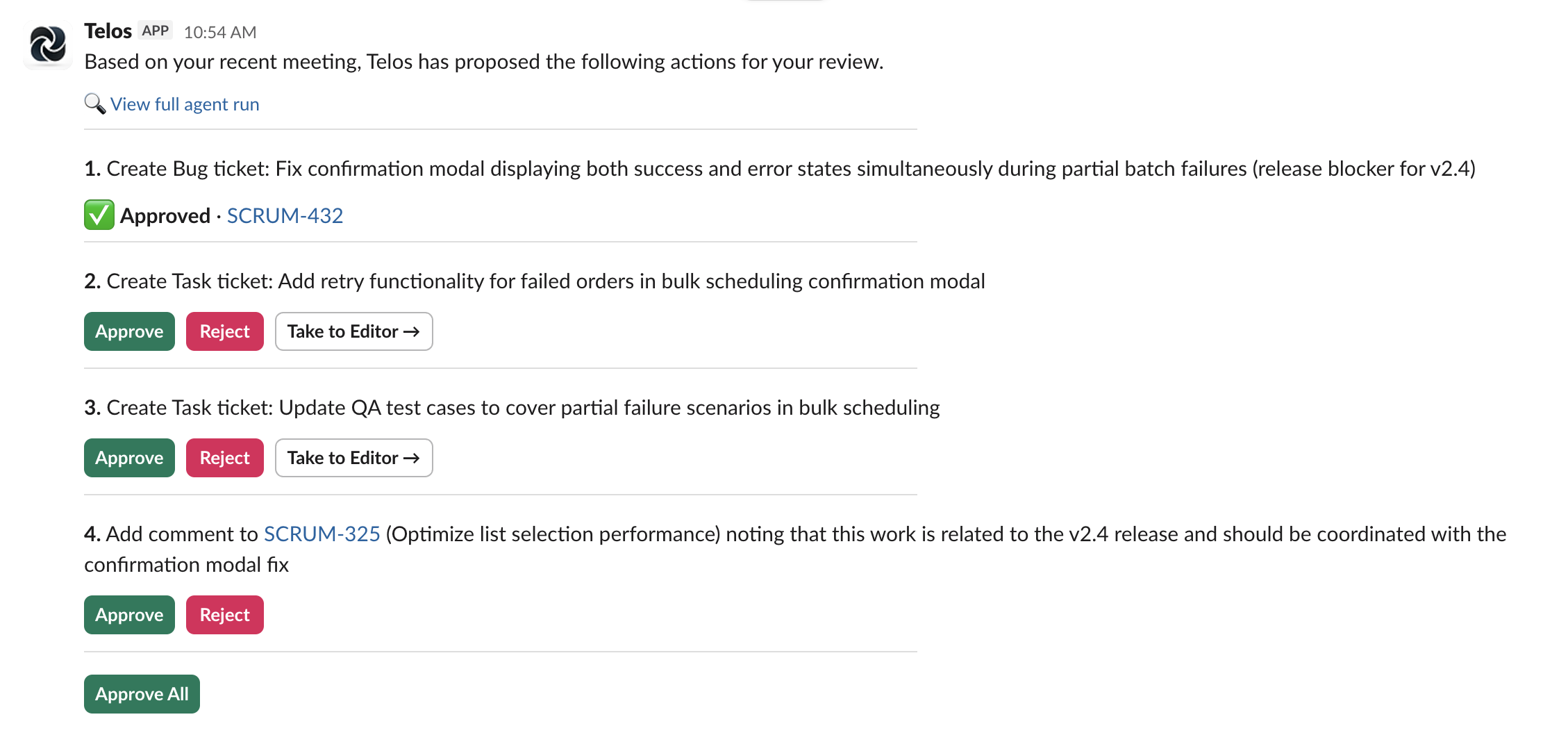
Approval Required. The agent proposes a set of actions and sends them to a Slack channel for review. Each action gets its own Approve / Reject buttons, and nothing touches your board until a human says yes. Trust but verify.
YOLO. The agent executes directly and posts a summary of what it did. For teams that want maximum automation with minimal friction. The board is updated, and you get a Slack recap.
Most teams start with Approval Required. The ones that switch to YOLO tend to do it within a couple weeks, once they’ve built confidence in the agent’s judgment.
Slack-Native Approval Workflow
When running in Approval mode, the agent posts a clean, organized message to your chosen Slack channel. Each proposed action is listed with a plain-English description — “Create a High-priority Bug: Login timeout on mobile Safari” or “Transition ENG-42 to In Progress” — with individual Approve / Reject buttons.
There’s an Approve All button at the bottom for fast batch approval. Ticket keys in the descriptions are hyperlinked directly to the ticket in your PM tool so you can click through and check context before deciding.
For new tickets the agent proposes, there’s a Take to Editor button right in the Slack message. It opens a dedicated review page where you can read, refine, and edit every field — title, description, priority, assignee, labels — before approving. You get the speed of AI drafting with the control of human editing.
Everything a PM Would Do on the Board
The agent isn’t limited to creating tickets. It handles the full vocabulary of board actions:
- Create tickets and subtasks with full detail — title, description, priority, labels, assignee
- Update any field on an existing ticket
- Transition tickets between statuses (To Do → In Progress → Done)
- Assign tickets to team members
- Set priority and add labels
- Move tickets to sprints
- Add comments to existing tickets
- Link related tickets together
- Attach screenshots from browser agent runs
- Link to parent epics automatically when work belongs under an existing initiative
- Estimate story points based on the scope discussed in the meeting or email
On that last one — the agent automatically discovers how your specific Jira instance (or Linear, Asana, etc.) stores story points, so it works out of the box regardless of your project configuration.
Works Across PM Tools
Supports Jira, Linear, Asana, and Azure DevOps. The agent thinks in universal concepts — epics, story points, tickets, sprints — and automatically translates to whatever your tool calls them natively. Switch PM tools, and the agent keeps working without reconfiguration.
Custom Team Instructions
Teams can add their own instructions to tune the agent’s behavior. Examples:
- “Always use the Bug issue type for anything from the QA team”
- “Tag all meeting-generated tickets with
from-meeting” - “Never create tickets for topics discussed in the weekly sync unless someone explicitly asks”
These override the defaults when they conflict, giving each team full control over how aggressive or conservative the agent is.
High Bar for Action
This is important. The agent is deliberately tuned to act only on explicit commitments and clear decisions — not vague “we should look into that” mentions. It defaults to doing less rather than spamming your board with tickets nobody asked for.
We spent a lot of time getting this right. An agent that creates too many low-quality tickets is worse than no agent at all. Quality over quantity, every time.
Full Transparency
Every approval message includes a link to view the agent’s full reasoning — what it searched, what it found, what it considered, and why it proposed each action. Full auditability, no black box. If the agent made a questionable call, you can see exactly why and adjust the custom instructions accordingly.
Try It
The Proactive Agent is available now for all Telos teams. If you’re already a customer, you can enable it from your team settings. If you’re not, book a demo and we’ll walk you through it live.
The Proactive Agent is included in all Telos Pro and Enterprise plans.
See also: What is an AI agent for project management?, how agentic AI works specifically for Jira, and how the AI agent project manager role is evolving.